
Jun 26, 2026News & Insights
Moto G9 Power Screen Replacement Guide
Detailed guide to replace Moto G9 Power screen. Compare Incell TFT vs normal LCD, no‑frame installation steps, and wholesale buying tips. Read now.
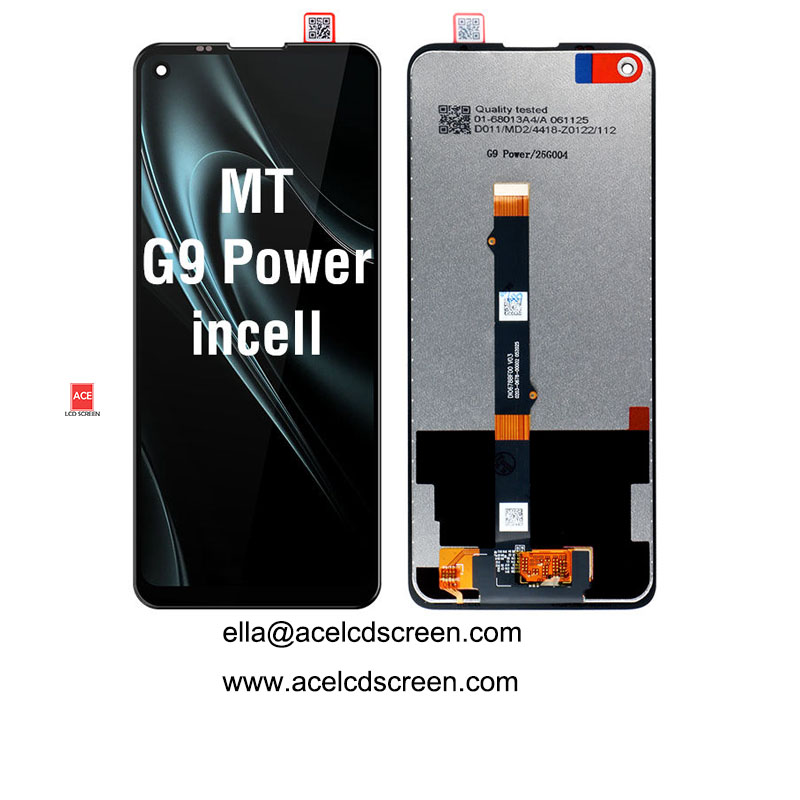
Moto G9 Power Screen Replacement Guide
Published by Ace LCD Screen | 8 min read | Last updated: April 2025
Introduction
The Motorola Moto G9 Power is a popular budget phone with a massive 6.8-inch display and a huge 6000mAh battery. Its large screen is beautiful but vulnerable. If you run a repair shop or sell spare parts, offering a high-quality Moto G9 Power screen replacement can bring steady profit.
This guide covers everything you need to know:
- Which LCD technology to choose (Incell TFT vs normal LCD)
- With frame vs no frame – pros and cons
- Step-by-step installation for no-frame displays
- How to spot a reliable wholesale supplier
- Common mistakes and how to avoid them
Let's dive in.
Why Moto G9 Power Screen Replacement Is in High Demand
The Moto G9 Power sold well in markets like Latin America, India, and Southeast Asia due to its long battery life and large screen. A cracked screen is one of the most common repairs. Unlike expensive OLED panels, the G9 Power uses an LCD, which is more affordable to replace – but only if you source quality parts.
Incell TFT vs Normal LCD – Which Should You Buy?
Many suppliers claim to sell "OEM quality" screens, but the technology varies greatly.
Incell TFT (Recommended)
- Touch sensor is embedded inside the LCD layer.
- Thinner (0.8mm) – fits perfectly without pressure points.
- Brighter (450 nits) – good outdoor visibility.
- Faster touch response – no lag or ghost touches.
- Less reflective because there is no air gap.
Normal LCD (Avoid if possible)
- Touch sensor is a separate layer glued on top.
- Thicker (1.2mm+) – may create pressure spots.
- Lower brightness (350 nits) – hard to see in sunlight.
- Slower touch – customers may complain about unresponsive areas.
- More reflections – looks cheap.
Verdict: For a professional repair, always choose Incell TFT. Your customers will notice the difference and leave positive reviews.
No Frame vs With Frame – What's the Difference?
No Frame (Our product)
- You receive only the LCD panel + touch sensor (no plastic/metal frame).
- You must reuse the original frame from the broken screen.
- Requires cleaning and new adhesive.
- Lower cost (saves $2-5 per unit).
- Recommended for experienced technicians.
With Frame
- LCD comes pre-assembled into a new mid-frame.
- No need to clean or re-use old frame.
- Easier and faster installation (15 minutes vs 45 minutes).
- Higher cost but great for beginners or busy shops.
Tip: If you are ordering for a repair shop with skilled staff, no-frame screens offer better margins. If you sell to end-users, offer with-frame.
Step-by-Step Installation (No-Frame LCD)
Follow these steps carefully to avoid damaging the new Incell display.
Tools Required
- Heat gun or hair dryer (set to low)
- Plastic opening picks
- Phillips #00 screwdriver
- T7000 or B7000 glue (black)
- Tweezers
- Isopropyl alcohol (90%+)
- Microfiber cloth
- Rubber bands or clamps
Installation Steps
Step 1: Remove the broken screen.
Heat the edges for 30-60 seconds. Insert a plastic pick between the frame and glass. Slowly work your way around. Be careful not to bend the frame.
Step 2: Disconnect the old LCD.
Remove the back cover (plastic – follow standard Moto G9 Power teardown). Unscrew the motherboard shield. Gently disconnect the LCD flex cable.
Step 3: Clean the original frame.
This is the most critical step. Remove all broken glass pieces. Clean with alcohol to remove old adhesive. The frame must be completely smooth – any leftover glass will cause ghost touches.
Step 4: Apply new adhesive.
Apply T7000 glue evenly around the frame edges. Use a thin, continuous line.
Step 5: Prepare the new Incell LCD.
Peel off the protective film from the back.
Step 6: Place the new screen.
Align carefully with the top edge. Lower gently. Press the edges firmly for 10-20 seconds.
Step 7: Secure with rubber bands.
Wrap rubber bands around the phone. Let cure for 2-4 hours (or overnight).
Step 8: Reconnect and test.
Reconnect the flex cable. Test touch and display before final assembly.
Step 9: Close the phone.
Replace the shield, screw everything back, attach the back cover.
Common Installation Mistakes
Mistake | Consequence | How to Avoid |
|---|---|---|
Not cleaning the frame | Ghost touches | Use alcohol, clean 2-3 times |
Too much glue | Glue seeps into LCD | Apply thin, even line |
Pressing on LCD center | Cracks glass | Press only edges |
Skipping test before closing | Have to reopen | Always test first |
Low-quality adhesive | Screen lifts later | Buy genuine T7000/B7000 |
How to Choose a Reliable Wholesale Supplier
✅ Real factory – Ask for factory address and photos.
✅ 100% tested – Request test video for your order.
✅ Warranty – 1 year is a good sign. Avoid 30-90 days.
✅ Packaging – Bubble bag + foam + carton.
✅ Low MOQ – 1-5 pcs allows testing.
✅ Payment options – TT, Western Union, PayPal.
At Ace LCD Screen, we meet all these criteria.
Why Ace LCD Screen for Moto G9 Power LCDs?
- Factory direct pricing – save 20-30%
- Incell TFT quality – never normal LCD
- 1 year warranty – free replacement
- 100% tested – on real Moto G9 Power
- MOQ 1 piece – samples or small shops
- Fast delivery – 3-5 days via DHL/FedEx
- Custom packaging – logo on boxes (bulk)
Bulk Order Discounts
Quantity | Discount |
|---|---|
1-10 pcs | Standard |
11-50 pcs | 5% off |
51-200 pcs | 10% off |
201-500 pcs | 15% off |
500+ pcs | Contact us |
Shipping discounts available for larger volumes.
Frequently Asked Questions (FAQ)
Q: Does this LCD fit Moto G9 Play or G9 Plus?
A: No. Only Moto G9 Power. Check model number (XT2091).
Q: Do you sell with frame?
A: This is no frame. Contact us for with-frame versions.
Q: What if the LCD arrives damaged?
A: Send photos within 7 days. We replace free.
Q: Do you provide installation support?
A: Yes, we can send a video link.
Q: Can you ship to my country?
A: Worldwide shipping. Express 3-5 days to most countries.
Get a Wholesale Quote Now
Choose Ace LCD Screen for quality, warranty, and factory-direct prices.
Please include:
- Your name / company
- Quantity
- Country (for shipping)
- Any special requirements
Your Best OEM Partner in China.